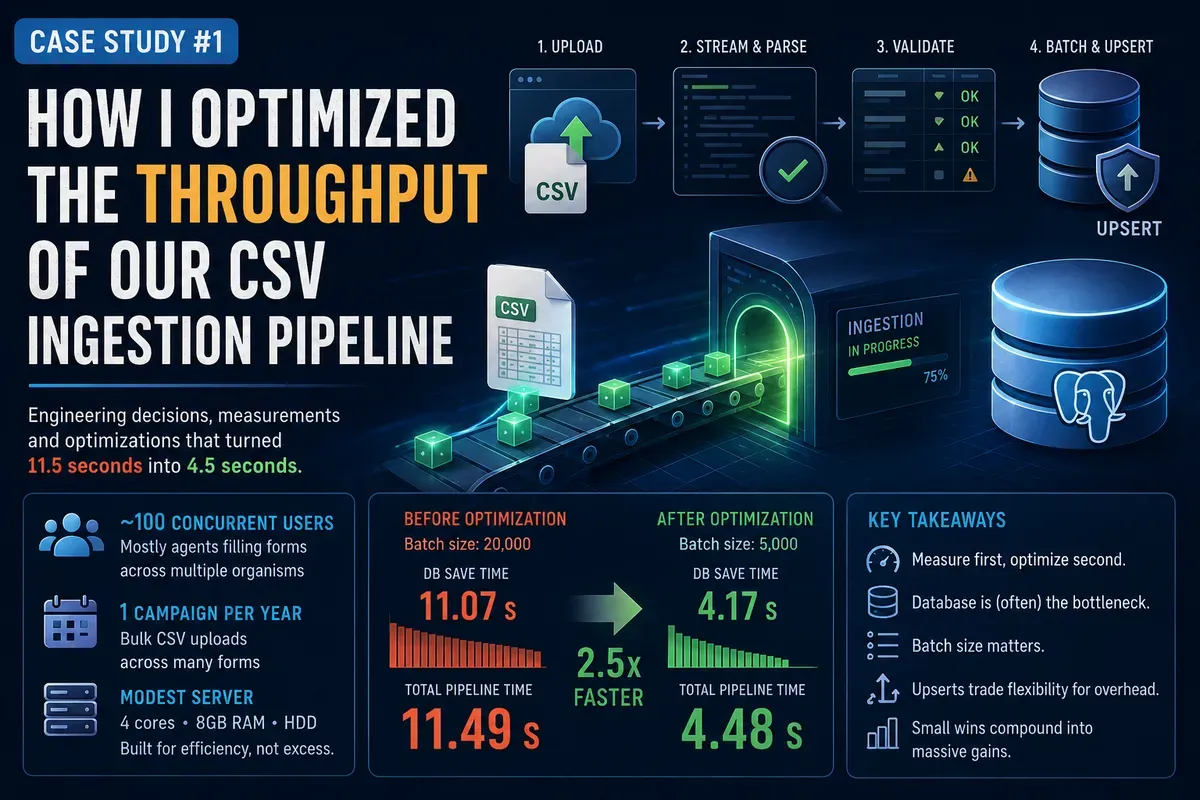
Case Study #1: How I optimized the throughput of our CSV ingestion pipeline
2026-07-01
Context
At my current job at DISCOM, I had the honor to design and build a data collection and analysis platform about the cotton industry in Burkina Faso. Our customer is an important actor in this industry and used to hand out word and excel documents to a couple of organisms to be filled manually and gathered back for synthesis.
This process was slow and error prone and the platform I was going to build would make everybody's life easier. The agents from the different organisms would just have to log in, and fill digital forms. The platform would support progress tracking and validation, making it impossible to miss fields, lose progress and enter invalid data. Our customer could then query the data, visualize it and generate reports for intelligence and better decision making that can impact the whole industry.
Part of the data collection involves quantities that are too large to be typed manually, I had to come up with a solution.
Data Ingestion
When using applications, we seldom encounter a situation where we need to provide massive amounts of data. Even long forms can be filled in less than a hour by hand. Regular users don't even have that much information to provide at once, but how do companies end up millions, if not billions of data about their users? Well, they collect them over time by smaller bits until the whole data set grows large.
As of today, Whatsapp has ~3.0 to 3.5 billion monthly active users worldwide, which is massive. What if each one of them was sending at least one message every day. This would represent a colossal amount of data. Could you load all this data at once in the database without the process taking weeks or months? This is the problem many companies face.
We live in the era of data. Online activities generate a massive amount of bytes, even real life data is tracked and converted in digital formats. Data enables us to do many things like training AI models, making predictions and discovering hidden trends and correlations. No wonder then that over time, the need to transfer large data sets across systems became a serious thing.
From first principles, what does it mean to transfer data? It just means moving bytes in system A to system B. It becomes obvious that like in real life, we are fundamentally constrained by the amount of bytes, the bandwidth and the latency between the systems. But just copying bytes is not enough, different systems might expect different formats and even enforce integrity rules. Making sure that all incoming data is correct requires work and thus, adds up some latency.
This is the problem we will examine in this article, as I show you how I built a data ingestion pipeline for our system.
A starting point
Our platform is built in Django and uses a PostgreSQL database. We have to find a way to let third party users load massive data into our system without knowing too much about our architecture and implementation.
A good starting point is to define a common data format. There are plenty of data formats that exist, like: json, yaml, excel, csv, raw text, etc. But they are not all equally suited for all data ingestion use cases. For instance, json is relatively expensive to parse, yaml is hard to read when there is too much data, excel sheets contain extra metadata and format specific details that can make parsing heavy, raw text is simple but without structure, it is easy to mess up things.
An excellent candidate would be csv. It offers us a structure that closely matches that of actual database tables and excel sheets without the extra overhead. It is also human readable.
So, this is how our system will look like:
(Cotton Society Database) --- csv --> (Our Pipeline) --> (Our Database)
In short, the agents from the cotton societies will export their data in a csv file that will then be uploaded on our platform and processed before being saved in our database. The part that actually matters to us starts at the uploading phase.
Designing the pipeline
Before jumping to the design of the platform pipeline, we need to examine the problem at its bare form. We have: A csv file, a processing step, and a database storage step. For the purpose of this case study, I ran some benchmarks with Python 3.14.6:
| Size | Rows | File I/O | I/O throughput | CSV Parse | Parse throughput |
|---|---|---|---|---|---|
| 1 KB | 22 | 0.005 ms | 180 MB/s | 0.031 ms | 702,534 rows/s |
| 10 KB | 232 | 0.005 ms | 2,155 MB/s | 0.165 ms | 1,407,135 rows/s |
| 100 KB | 2,326 | 0.059 ms | 1,743 MB/s | 1.67 ms | 1,390,891 rows/s |
| 1 MB | 23,830 | 0.170 ms | 6,470 MB/s | 19.2 ms | 1,240,823 rows/s |
| 10 MB | 238,312 | 2.91 ms | 3,941 MB/s | 198 ms | 1,205,465 rows/s |
| 100 MB | 2,383,126 | 52.7 ms | 2,264 MB/s | 2,320 ms | 1,027,348 rows/s |
CPU: Intel(R) Core(TM) i7-8565U (8) @ 4.60 GHz GPU: Intel UHD Graphics 620 @ 1.15 GHz Memory: 16GB
We can observe that reading large csv files is relatively cheap, the true cost happens at parse time. It means that loading and parsing 2 millions of rows in python takes roughly 2 seconds. Not bad. But what about writing that same data to a database? Let's give it a try:
| File size | Rows | Batch 1 (row-by-row) | Batch 10 | Batch 100 | Batch 1,000 | Batch 10,000 | Batch 100,000 |
|---|---|---|---|---|---|---|---|
| 1KB | 22 | 98.43 ms | 393.66 ms | — | — | — | — |
| 10KB | 232 | 1,069.96 ms | 641.68 ms | 1,536.91 ms | — | — | — |
| 100KB | 2,326 | 413.14 ms | 286.25 ms | 805.44 ms | 841.14 ms | — | — |
| 1MB | 23,830 | 4,088.48 ms | 2,325.35 ms | 3,567.57 ms | 3,861.63 ms | 4,441.70 ms | — |
| 10MB | 238,312 | 26,146.34 ms | 7,813.70 ms | 3,711.49 ms | 3,659.43 ms | 3,505.75 ms | 3,673.33 ms |
| 100MB | 2,383,126 | 425,754.07 ms | 99,521.69 ms | 68,306.64 ms | 87,310.71 ms | 57,109.26 ms | 35,829.49 ms |
These are insane numbers. We can see that loading data in the database is much slower than parsing. Different loading patterns also have different performance. The most blatant example is the row by row insertion. The performance is terrible because we make new round trips for each row, which adds overhead. Of course this is not the recommended approach, instead, whenever you have a non trivial amount of rows, use batch inserts instead. But larger batch sizes are not necessarily better. It is up to you to measure and run benchmarks to find the optimal batch size.
Loading 2 millions of rows with a batch size of 100 thousand takes 35 seconds. Can we go faster? Let's try a trick:
| Method | Time | Rows/s | MB/s |
|---|---|---|---|
| COPY FROM file | 12.37 s | 192,593 | 9.6 |
| COPY FROM buffer | 15.26 s | 156,160 | 7.8 |
| Batch INSERT (100K) | 35.83 s | 66,522 | — |
| We nearly halved the loading time! |
Real system benchmarks
Here is an example measurement of one of our first ingestion processes we had with 20 K chunk size:
| Metric | Value |
|---|---|
| Rows processed | 16,581 |
| Chunk size | 20,000 |
| CSV scan | 61.5 ms |
| Data preload | 134.9 ms |
| Parsing | 84.8 ms |
| Database save | 11,071.6 ms |
| Processing phase (excluding preload) | 11,293.6 ms |
| Total pipeline time | 11,490.1 ms (11.49 s) |
Loading a csv file in memory with almost 17 thousand rows took 60 ms, we also did some prefetching to gather foreign keys in order to avoid frequent DB lookups. Parsing the file took 85 ms. The largest amount of time was spent loading the data in the database, roughly 12 seconds.
To put things into perspective, an optimized C parser with SIMD can parse 10 MB of csv in less than 5 ms. The file from the previous table was less than 1 MB. This shows that despite python being terribly slow, the real bottleneck remains our database logic. It is therefore clear that we should focus on how we talk to the database.
Observation This is a compelling reason to always measure before you try any sort of optimization. Never try to guess and outsmart the machine. Put some logs here and there, measure and compare. You'll be surprised by how little you know about how things really work.
We use PostgreSQL as our primary data store. It is not a slow database by any means, it is fully capable of dealing with massive data at scale, we have to investigate how we actually use it.
Let's first think about an elephant in the room: indexes. They can considerably speed up your reads, and they can also nuke your write performances if used wrong. Should we get rid of indexes? I'd say that we should keep them and be wary of how we use them. As a reminder, the platform is both a data collection system and an analytics provider. Storing data is not the only problem, we need to quickly query big loads of data across years with a low budget server and simple architecture.
SOFITEX has today registered very roughly 7 K farmer cooperatives and 200 K farmers. Only a single record tracks data per farmer, and the other granular records track data per cooperative and some other data that can multiply the total rows.
Campaigns can go back to the year 1950 up till today, and our platform should be good enough to be used in the future. If we assume we are in 2030: 80 years x 170.000 rows = 13.600.000 rows!
Now let's take 20 records for the cooperatives: 20 x 7.000 x 80 = 11.200.000 rows! (We even omitted the multiplicative effect of some records)
SOFITEX by itself could potentially take several millions of row space in the database. We can safely assume that the platform will at production eventually host 50 millions or more rows. Giving up on indexes would be shooting ourselves in the foot. A cache-only solution would also bite too much on our RAM. Let's find other solutions.
What about latency? All our services live in containers on the same cloud machine. We also don't use row by row inserts, which would be exponentially slower, instead, we use bulk upserts provided by our Django ORM.
Why UPSERT in particular? Let's first define what it is. It doesn't have a special keyword in SQL (at least in PostgreSQL), it is just a like a regular INSERT with a fallback strategy consisting in updating fields instead if we happen to trigger a Unique Constraint error. In other terms, when you try to create an item that already exists, you can choose to instead update some fields, and you can do this in a single batch in an atomic fashion.
The base syntax in PostgreSQL is as follows:
INSERT ... ON CONFLICT DO UPDATE
This feature supports many more strategies to deal with conflicts, but this flexibility is not free. It mixes the cost of a regular INSERT with additional overhead for handling conflict resolution. If your payload contains a lot of conflicts, it can be penalizing, can we design our application in a way to avoid conflicting data in the first place?
Imagine an agent from a cotton society uploads a csv file with millions of rows for the first time on the platform. No conflicts. Now let's say that a colleague from the same organism logs in to provide additional entries to the aforementioned set of data. Should he delete the entire uploaded set? Or should he be able to just upload whatever new items he wants? Of course, the latter is optimal for better UX. Also consider the situation where agents happen to gather new fresh data. It means we need a way to handle duplicate entries as conflicts cannot be avoided easily. It follows then, that using upserts is a good decision here and should not be optimized away.
What else can we look after to squeeze out more performance? The size of our SQL payloads maybe?
Even if we assume the raw csv data to have a small byte size, we must not forget that this data has to be formatted and sent along SQL statement. This mix can drastically increase the size of the final payload being sent to the database to be parsed. In a setting where the bandwidth is scarce, this can incur extra-latency along with the parsing.
The total size of the SQL sent for our previous data set is 1412910 bytes -> 1.41291 MB. Yet, the original size of the csv file was roughly 350 KB. Formatting our raw data into a bulk upsert made the original byte size grow by a factor of 4x. What if we send a 5 MB csv file? Our measurement gave use 15 MB!
All this SQL must be parsed, planned and then executed. which adds overhead. A good starting point is to leverage the batch_size with Django ORM's bulk insert to let PostgreSQL spend less time parsing before executing actual inserts. Here are the results for the same data set and 5000 batch_size:
| Metric | Value |
|---|---|
| Batch size | 5000 |
| Rows processed | 16,581 |
| Chunk size | 20,000 |
| CSV scan | 32.3 ms |
| Data preload | 69.7 ms |
| Parsing | 143.1 ms |
| Database save | 4,172.5 ms |
| Processing phase (excluding preload) | 4,409.0 ms |
| Total pipeline time | 4,478.7 ms (4.48 s) |
We went from 11.5 s to 4.5 s which is a huge gain! The larger data set of 170 K rows completed in 33 seconds. Is it fast enough now? Remember that the platform is designed for 100 concurrent users. Most of them will be filling forms, and only a quarter of them require csv uploading. At minimum, we will have roughly 25 x 4 = 100 csv uploads assuming no errors and re-uploads will occur. The aforementioned 170 K rows come from an actual real potential data set from the biggest cotton society, which means that a single csv upload won't take more than a minute for sure. Furthermore, the agent can scroll past the ongoing uploading and take care of other forms (and upload other files). The async nature makes the waiting bearable, especially when they have an entire year to collect their own data and fill our forms.
Now we have to consider the UX when multiple agents are using our platform concurrently.
Takeaway
An important thing is to realize that what can be considered as a large data set can vary depending on the context. One million of rows might sound big to you, but the average consumer desktop can load and parse them in a quick amount of time.